
AxPLCcomm
Connect your PLC to Excel, Power BI and the cloud
With AxPLCcomm, Power BI, Excel and everyday office software read and write PLC data as if the PLC were a database, using the database connector they already have, with no special driver. For complete projects, the Axzon team integrates, programs and supports.
Read and write PLC data; it arrives directly (Excel, .NET) or through the Gateway (SQL, OPC UA, MQTT).
From the PLC to your system in three steps
Create your account and download
Quick sign-up on the Axzon portal and installer download for Windows or Linux.
Try it for 90 days
All features, with up to 5 addresses and 1 connection per protocol, with examples in the manual in Excel, VBScript, C# and SQL.
Activate your license
Activate directly in the program or by file, even on computers without internet access.
Built for shop-floor integrators
System integrators
Deliver data collection and integration projects faster, with one component for several PLC brands.
Engineering and maintenance
Bring machine data into spreadsheets, reports and KPIs without expensive software.
Industrial IT and developers
Use the .NET library or the SQL Gateway to connect PLCs to systems, ERP, MES and Power BI.
The leading PLCs on the market
| Protocol | Equipment | Platform |
|---|---|---|
| Siemens S7 | S7-300, S7-400, S7-1200 and S7-1500 over Ethernet | Windows and Linux |
| Modbus TCP | PLCs, drives, meters and HMIs; Modbus/TCP Security (TLS) | Windows and Linux |
| EtherNet/IP | ControlLogix, CompactLogix and Micro800 (symbolic tags); SLC 500, PLC-5 and MicroLogix (PCCC) | Windows and Linux |
| OPC UA (client) | OPC UA servers in PLCs, SCADA and gateways, with security and certificates | Windows and Linux |
| OPC DA (client) | OPC Classic servers over COM/DCOM | Windows |
From Excel to the cloud with one product
COM component
Excel and Access (VBA), VBScript, VB6 and COM-capable SCADA, in 32 and 64 bits.
.NET library
AxPLCcomm.dll for C# and VB.NET, in applications and services (.NET Framework 4.8, or .NET 8 and later).
Manager
Manage multiple PLCs, on different protocols, from a single object: register, connect, read and write.
SQL Gateway
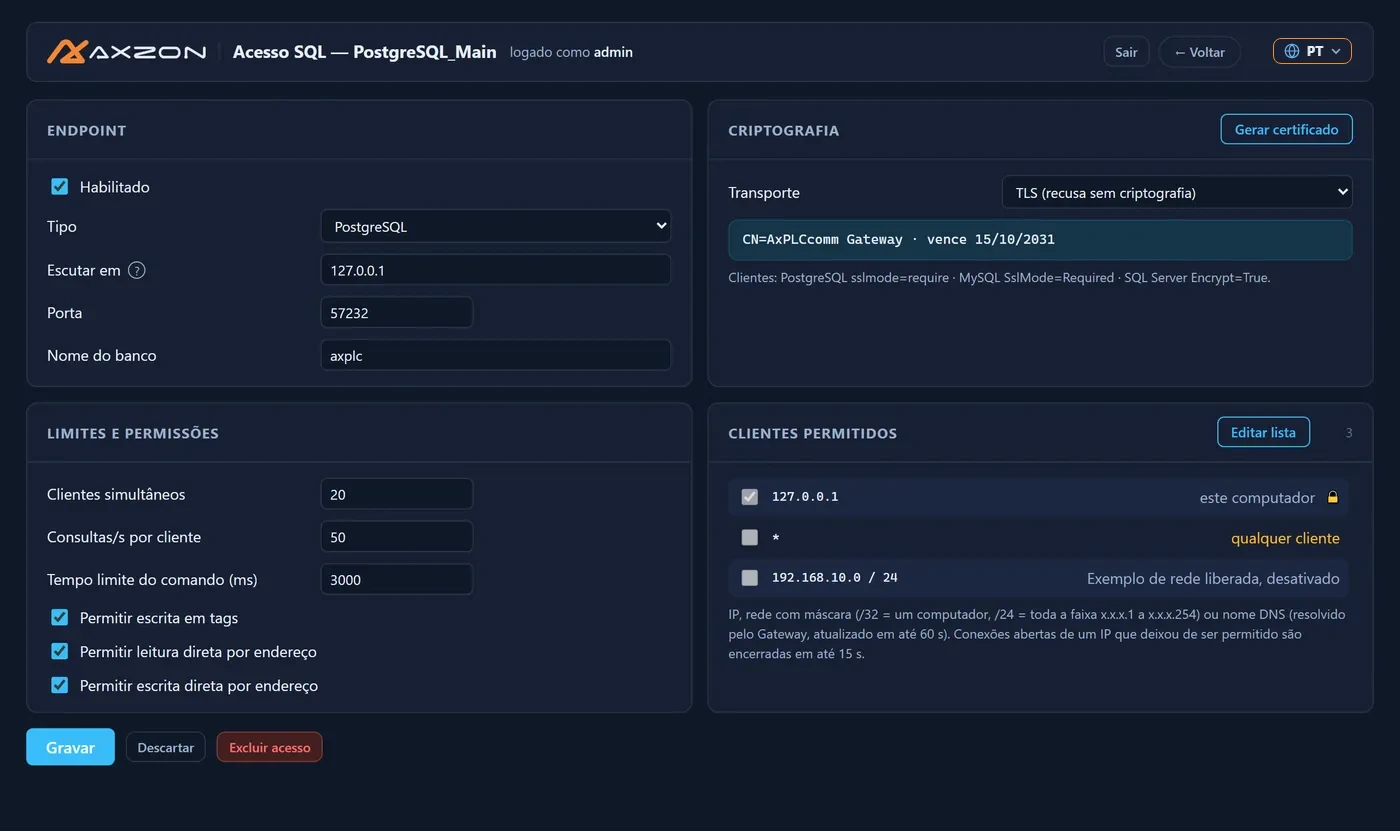
Virtual tables to read and write with SELECT and UPDATE, compatible with PostgreSQL, MySQL and SQL Server.
OPC UA server
PLC tags as OPC UA nodes for SCADA, MES and other systems.
MQTT Sparkplug B
Publishes tags to an MQTT broker for cloud, IIoT and SCADA.
Gateway: a service that keeps PLCs connected
The Gateway runs as a service on Windows or Linux, keeps the PLC connections alive and delivers the data to SQL, OPC UA and MQTT. Everything is monitored and configured through an HTTPS web page with users and roles.
- Automatic reading (polling) with cache and reconnection
- Write queue with expiration and audit trail
- Logs, diagnostics and configuration export
- Command line for automation and scripts
Requirements
Windows
Windows 7 SP1 to Windows 11 and Windows Server 2008 R2 SP1 or later, with .NET Framework 4.8: full edition, with all features. There is also a .NET 10 edition (Gateway and DLL for .NET 8 or later) without the COM component: it does not work with Excel/VBA, VBScript or VB6.
Linux
Linux x64 with glibc 2.27 or later. Gateway (SQL, OPC UA and MQTT), with .NET included.
License and trial
- Per-computer license, activated in the program or by file, even offline
- Return the license to move to another computer
- 90-day trial with all features, including the Gateway (up to 5 addresses and 1 connection per protocol)
- Technical manual for customers, in Portuguese, English and Spanish
Frequently asked questions
Do I need to code to use AxPLCcomm?
Not necessarily. In Excel, a few lines of VBA are enough to read and write tags. With the Gateway, data goes to the database, OPC UA or MQTT through web-page configuration only.
Does it work with S7-1200 and S7-1500 PLCs?
Yes. The Siemens S7 driver supports S7-300, S7-400, S7-1200 and S7-1500 over Ethernet. The manual explains how to enable access (PUT/GET) and use non-optimized data blocks.
Can I bring PLC data into Power BI?
Yes. The SQL Gateway exposes tags as tables compatible with SQL Server, MySQL and PostgreSQL, which Power BI and other tools read directly.
Does the Gateway run on Linux?
Yes. The Gateway runs as a service on Linux x64. The COM component and OPC DA are Windows only.
How does the trial work?
90 days with all features, limited to 5 addresses and 1 active connection per protocol. After that, just activate the purchased license on the same computer.
Related articles
PLC data in Excel, with no typing
Spreadsheets that update themselves with machine values: less typing, fewer errors and up-to-date information for production.
Production KPIs in Power BI straight from the PLC
OEE, downtime and output on Power BI dashboards fed by your PLCs, with no manual collection and no spreadsheets in between.
Want to see AxPLCcomm with your PLCs?
Download the 90-day trial or talk to our team for a demo.